Blog 5: Exploring AI
I’m not a good or confident negotiator so I used the "Negotiation Simulation Tutor" in Chat GPT to practice negotiating and to receive feedback on my (attempts at) negotiating, just as Mollick did in the YouTube lecture. It was exciting and fun to experiment with Chat GPT in this way. Watching AI change its negotiation strategy, push for a deal, and make adjustments/concessions when needed was fascinating. I truly hope that next time I am in a negotiation, I will have Chat GPT working on MY side of the bargaining table!
Seriously though, as I reflect on this random AI exercise, I
have a few concerns. I hope that AI will
always be used to enhance the human experience – not replace it. I think that it is a great tool for humans to
use- with human oversight – but I don’t think that it ever needs to be fully autonomous.
While AI can pull up and analyze enormous amounts of data/information at an
incredibly quick speed, it doesn’t have the depth of human emotion or intuition. Data analysis is very helpful during a negotiation,
but emotional intelligence is beneficial, as well. AI may have some biases that affect its
performance, and it will never have the “gut check” feeling that a human gets
when they need to reflect upon or think twice about a decision before making
it.
When considering AI’s place in education, I think that Mollick is correct in his stance that educators should legally and ethically experiment with the capabilities of AI. We need to accept that AI is here to stay, which means that we need to figure out how to best utilize it. It is important to keep our minds open and immerse ourselves in what AI can offer us as educators. From gaining a deeper understanding of content, to lesson planning and better time management strategies, AI can truly change the way we do things.
Most importantly,
we need to figure out the ways we can use AI to positively impact student
learning and achievement. We must be careful to maintain our professional
integrity and approach AI thoughtfully and intentionally, understanding that AI
is a tool that we can use to attempt to strengthen and improve many aspects of education. We must ensure that we never forget the “human
element” of education, make ethical decisions, and share what we learn – both the
positive and negative – with our professional community.
References:
Global silicone valley. (2024, April 16). Co-Intelligence: AI in the classroom with Ethan Mollick. [Video]. Youtube. https://www.youtube.com/watch?v=8FnOkxj0ZuA
Blog 4: Adaptive Technology - Bookshare

orange and blue Bookshare Logo
Technology-based adaptive learning systems provide students with assistance and resources that are specifically tailored to meet their learning needs. According to bookshare.org (2024), Bookshare is the world’s largest accessible online library for people with print disabilities such as visual impairment and/or dyslexia. This adaptive learning system provides a specialized library with millions of audiobooks and ebooks for students who struggle to read print. The Bookshare library is expansive and includes bestsellers, new releases, fiction, nonfiction, mysteries, autobiographies, career resources, textbooks, educational titles, children’s books, young adult titles, etc. New books are available in the Bookshare collection on the same day they are released in stores and online.
The assistive reading features within the Bookshare library customize
books for people to best fit their reading needs. Readers can listen to audiobooks or read
ebooks that have word-level highlighting, large text or braille. Bookshare also offers other ways to customize
reading experiences to best fit the needs of each reader. Visual components
like text size, text color, and highlighter color can be customized, and audio components
such as reading speed can be adjusted/customized, as well.
With Bookshare, reading can take place on multiple devices including laptops, phones, and tablets. The Bookshare Reader app can be utilized on desktops, laptops, mobile devices, tablets, and Alexa Smart Speakers. Bookshare is a totally free, federally-funded reading tool for US students/residents who have a qualifying disability that prevents them from reading traditional (paper-based) books.
Students sign up through the Office of Special
Education programs using this link: https://www.bookshare.org/sign-up. In order to qualify, teachers or other
instructional staff must certify that a student has a barrier that prevents them
from effectively being able to read/interact with a traditional print book. Students do not need an IEP or 504 plan to
qualify. Schools are also able to sign
up to provide students with this adaptive technology. Adults can sign-up as an Individual US Non-Students
online and must provide proof of disability.
Bookshare is a technology that can be used by all ages from toddlers to
senior citizens.
Bookshare.org has valuable information for teachers and parents about their program. Bookshare also has a YouTube channel that educators, students, and families can subscribe to by clicking this link: Bookshare YouTube Channel There are many helpful videos and tutorials that show how to use this technology effectively. Additionally, you can follow Bookshare's Facebook, Instagram, and X accounts to stay up to date on the latest Bookshare happenings.
References
Bookshare. (2024). Bookshare. https://www.bookshare.org/
Blog 3: Google Chromecast in the Classroom
Google Chromecast is a “dongle” or a plug-and-play device that teachers can plug into the HDMI port of a projector or Smart TV. Once plugged in, the Chromecast installation is simple. The dongle must be on the same Wi-Fi network as the devices in the classroom, and the teacher must download the Google Home app. After the app is downloaded, the teacher must follow a few simple on-screen installation instructions to customize the Chromecast settings to meet the needs of the classroom/students. Once Chromecast is installed, teachers and students can cast both audio and video content from their mobile devices (smart phones, laptops, tablets, etc.) to a Smart TV or projector wirelessly. Teachers often use Chromecast to share online demonstrations, app explanations/tutorials, presentations, videos, multi-media content, and other educational resources with their students.
Chromecast is an affordable device. The cheapest, most basic
model costs $29.99; however, the cost will vary depending on the specific model
and features needed for each classroom.
Additional costs could include any extra adaptors or cables needed to
connect the dongle, as well as subscriptions to educational content streaming
services if a teacher desires to use those.
an image of the Google Chromecast Dongle
The R.A.T. model is a tool developed by Dr. Joan E. Hughes that allows teachers to assess their own classroom technology integration. The RAT model is used below to assess the efficacy of the use of Google Chromecasts in K-12 classrooms.
Replacement
The “R” stands for Replacement. Google
Chromecast can serve as a replacement for textbooks, anchor charts,
posters, overhead projectors, etc. Instead of having to create paper-based visuals
or bulky charts, teachers can share interactive content (educational videos,
images, presentations, text, photographs, etc.) in a more dynamic and engaging
way on a large screen.
Amplification
The "A" stands for Amplification. Google Chromecast
can amplify instruction by increasing efficiency and productivity in the
classroom. Teachers and students can quickly and easily share
work, videos, instructional content, projects, presentations, etc. wirelessly. The ease of use and lack of cables, wires, plugs,
etc. maximizes every instructional minute and encourages active participation
and creativity in the classroom.
Transformation
The “T” stands for Transformation.
Google Chromecast transforms instruction by making presentation
of the content more engaging, creative, and authentic. Chromecast in the classroom enriches the instruction
for teachers as well as the the learning experience for students. It is a valuable tool for teachers that desire
to use technology in their classrooms in a relevant, interactive way.

R.A.T. graphic that explains the components of the RAT Model
Additional Resources for Teachers:
Chromecasting in a Classroom - How to Setup
References:
R.A.T. model. (2016, June 24). Tech Edges. Retrieved July 9, 2025, from https://web.archive.org/web/20190612101737/https://techedges.org/r-a-t-model/
Streaming help. (2025, July 9). Google. https://support.google.com/chromecast/chromecast?visit_id=638876845690391773-3238203753&hl=en&rd=1#topic=3058948
Blog 2: You Are What You Eat - Our Consumption Choices Directly Impact our Health and Well-Being

This graphic shows the yearly and daily amount of data consumption by the average US citizen.
https://neilleslie.wordpress.com/
In the digital world of today, unlike any other time in history, we can have any question answered with the click of a few buttons. We are inundated with news/information on our phones, tablets, and computers. Locating information is fairly simple but determining if the information we find is true or trustworthy often is not.
I very much enjoyed listening to “Fake News and Media
Literacy”, an interview with Clay Johnson, author of The Information
Diet, on The Liturgists podcast.
Prior to this podcast, I had not heard the term “information diet”, and
I immediately had a misconception of what that meant. I was thinking of “diet”
as a verb. When someone mentions, “going on a diet”, that term typically
implies the consumption of “less” food – or cutting back. When I first heard “information diet”, I figured
this podcast was going to suggest consuming less information to prevent the
overwhelm many of us feel from the constant stream of information that we
receive daily.
Instead, this “diet” was used as a noun, as in the kind of
food a person regularly eats – a conscious decision. This reframed my thinking to understand that
an information diet is the total information a person regularly consumes. It is a deliberate and conscious decision made to manage the volume, quality and reliability of the information consumed. To continue
this food analogy, our diets can consist of nutritious food or junk. We can consume an appropriate amount of food
to keep us healthy and strong or we can overconsume (even healthy foods) and become unhealthy. Similarly, our information diet can consist of an appropriate volume of high quality, relevant content or can consist of copious amounts of low value, untrue or possibly harmful content. When our information diet becomes unbalanced,
we often suffer the consequences mentally, emotionally, and relationally.
The key to maintaining a “balanced” information diet is to
be intentional and thoughtful about the information that we choose to digest. Johnson shared a song to help the podcast listeners
remember five key questions to ask to determine the credibility of sources.
1. Who wrote this?
2. Who published it? Do they have
an editorial review board?
3. When was it published?
(Date)
4. Are the sources cited? (Authors
and contributors should be named.)
5. Was it written with proper grammar
and mechanics?
As a school librarian, it will be important for me to model a healthy, balanced information diet. It will also be important for me to show my students how they can achieve one, as well. Explaining the importance of placing time limits on the amount of media consumed daily (particularly social media), exploring ways to determine credibility (using Valenza's (2016) strategies and tips), and taking intentional breaks from media consumption to read, play games, exercise, etc. are all helpful strategies that I can teach my students.
References
Gungor M. (Host). (2017, March 7). Fake News and
Media Literacy [Audio podcast]. In The Liturgists. The liturgists.
https://podcasts.apple.com/us/podcast/fake-news-media-literacy/id903433534?i=1000382332635
Valenza, J. (2016) Truth, truthiness, triangulation: A news literacy toolkit for a "post-truth" world. School Library Journal, https://blogs.slj.com/neverendingsearch/2016/11/26/truth-truthiness-triangulation-and-the-librarian-way-a-news-literacy-toolkit-for-a-post-truth-world/
Blog 1: Comparing/Contrasting AASL and ISTE Standards
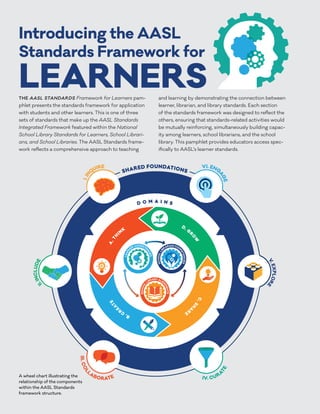
I was struggling to get a good grasp of the American Association of School Librarians (AASL) Standards and the International Society for Technology in Education (ISTE) Standards when I read through them separately. Thankfully, the AASL formulated a crosswalk of AASL and ISTE standards that I found especially helpful when attempting to better understand each set of standards. The organized format of the crosswalk (a table) made comparing each set of standards much easier for me.
After my discovery that the crosswalk greatly aided in my comprehension of these two sets of standards, it was serendipitous that I happened across Courtney Lewis’ article, “Leveraging Crosswalks for Communication” in Knowledge Quest. Lewis (2019) succinctly articulates two main reasons why this crosswalk is so helpful. She explains that this crosswalk helps achieve common language between both sets of standards. She also emphasizes how this crosswalk graphically represents the connection between administrators, learners, and teachers to the outside world with a big-picture view of the curriculum (Lewis, 2019).The American Association of School Library Standards
are composed of six foundations: Inquire, Include, Collaborate, Curate,
Explore, Engage. Each foundation has a list of key competencies that outline
its essential elements. The competencies are grouped into four domains that
mirror the inquiry process – Think, Create, Share, Grow. AASL
standards provide an integrated framework for learners, school librarians, and
school libraries.
The International Society for Technology in Education standards provide competencies for learning, teaching, and leading using
technology. The focus of ISTE Standards is not on specific devices or tools but
instead focuses on learning and the effective use of technology in schools
worldwide. These standards are
categorized into four groups specifically for students, educators, education leaders,
and instructional coaches. There are five
to seven standards listed for each group.
Both sets of standards emphasize the importance of students
focusing on goal setting and becoming self-directed learners. They both place an emphasis on student
collaboration and interaction with students from a wide variety of backgrounds. They also both promote the development of
critical thinking skills in students. Perhaps
most importantly, both sets of standards encourage students to become lifelong
learners who seek knowledge and use media, information, and technology ethically
and responsibly.
AASL standards place an emphasis on the process of learning
and the role of the school library within that process. Librarians and classroom teachers use the
standards collaboratively to figure out how to best teach content standards. Conversely, ISTE standards are content standards
and focus more on the final product (what is learned) than the process of
learning it. Another obvious key difference
between the two standards is the major emphasis on technology in ITSE
standards. While technology is
integrated into the AASL standards, it is not the focus.
When I am a school librarian, both the AASL and ISTE standards will provide guidance, structure, and support when I am developing a curriculum for the school library. They will also be helpful when I am collaborating with classroom teachers to develop lesson plans for other content areas. The integration and implementation of both sets of standards will result in developing students who are knowledgeable and capable lifelong learners.

infographic depicting a framework of the ASL Standards for Learners

infographic depicting a framework of the ASL Standards for Learners
References
AASL. (2018). National School Library Standards Crosswalk. Retrieved from https://standards.aasl.org/wp-content/uploads/2018/08/180828-aasl- standards-crosswalk-iste.pdf
Lewis, C. (2019). Leveraging crosswalks for communication. Knowledge Quest, 47(5), 42-43.
Subscribe to:
Posts (Atom)
-
I’m not a good or confident negotiator so I used the "Negotiation Simulation Tutor" in Chat GPT to practice negotiating and to rec...
-
Google Chromecast is a “dongle” or a plug-and-play device that teachers can plug into the HDMI port of a projector or Smart TV. Once plugge...